KDP Dream Journal Interior: A Practical Guide to Customization and Quality
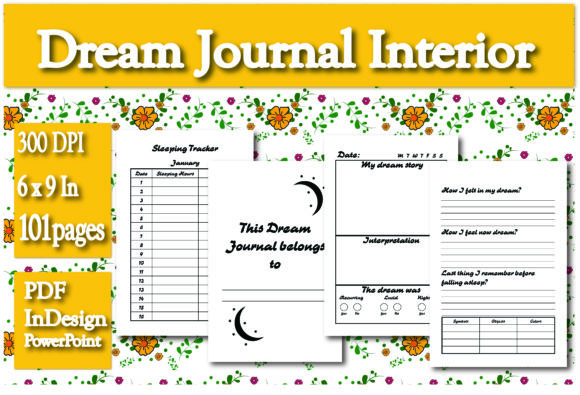
Creating a successful low-content book on Amazon KDP requires more than just uploading a generic template; it demands a thoughtful approach to user experience and technical precision. When evaluating a KDP Dream Journal Interior, the primary goal should be finding a balance between aesthetic appeal and functional utility for the end user. Many creators rush into publishing without considering how the interior actually performs in print or how editable the source files truly are. This specific resource addresses those concerns by providing a comprehensive 100-page layout designed for the standard 6 x 9 inch trim size, complete with both InDesign and PowerPoint source files alongside a print-ready PDF.
The inclusion of multiple file formats is significant because it directly impacts your ability to differentiate your product in a saturated market. However, having access to these tools does not automatically guarantee a high-quality result. Understanding the nuances of dream journaling layouts and the technical requirements of KDP printing is essential to avoid common pitfalls that lead to poor reviews or rejected manuscripts. By focusing on practical application rather than just file acquisition, you can create a product that genuinely serves adults interested in sleep tracking, lucid dreaming, and subconscious exploration.
Evaluating Editability Beyond the File Extension
A frequent misunderstanding among new KDP publishers is assuming that possessing an InDesign (.indd) or PowerPoint (.pptx) file equates to effortless customization. While this pack includes both, the learning curve and technical limitations differ vastly between them. Relying solely on PowerPoint for complex layout adjustments can lead to alignment issues that are difficult to correct later. PowerPoint is excellent for changing text, swapping fonts, or adjusting simple image placements, but it lacks the precise typographic controls necessary for professional book design.
Conversely, Adobe InDesign offers industry-standard precision but requires a steeper learning curve. A common mistake is attempting to redesign the entire interior in InDesign without understanding master pages or paragraph styles. This often results in inconsistent margins or page numbering errors across the 100-page document. Before committing to a workflow, assess your current skill level honestly. If you are a beginner, start by making targeted edits in PowerPoint to understand the structure. If you require structural changes, such as altering the grid system of the sleeping tracker or modifying the bleed settings, invest the time to learn InDesign’s master page functionality. This prevents the "frankenstein" effect where some pages look polished while others appear amateurish.
Optimizing the 6 x 9 Trim Size for Usability
The 6 x 9 inch dimension is the gold standard for trade paperbacks, yet many creators fail to account for how this physical size affects the writing experience in a dream journal. Unlike a lined notebook, a dream journal requires specific prompts and tracking tables. A critical error occurs when designers maximize text area without respecting the gutter margin. In a 100-page perfect-bound book, the inner margin must be sufficient to prevent content from disappearing into the spine crease.
When customizing this interior, verify that the "My Dream Story" section provides adequate line spacing. Adult users, particularly those writing immediately upon waking, often have messy handwriting. Cramped lines discourage consistent use. Ensure there is at least 0.75 inches of inner margin safety zone. Additionally, check the placement of the "Sleeping Tracker." If this element spans two pages or sits too close to the binding, it becomes functionally useless. Always order a physical proof copy after making layout adjustments to test the ergonomics of writing in the 6 x 9 format before listing the book for sale.
Strategic Use of Core Journal Elements
The value of a dream journal lies in its structured components. This interior includes three distinct elements: the ownership page, the sleeping tracker, and the narrative story section. Mismanaging the hierarchy or flow of these sections can confuse users. For instance, placing the "This Dream Journal belongs to" page as the very first page without considering flyleaf protection is a missed opportunity. In professional book design, this personalization page often works best after a title page or as part of a front matter cluster, giving the book a premium feel rather than a utilitarian one.
Regarding the Sleeping Tracker, avoid the mistake of over-complicating the data entry. Users tracking REM cycles or sleep quality want quick visual logging, not complex spreadsheets. If you modify the tracker, ensure the checkboxes or rating scales are large enough to mark easily with a pen. Test different pen types on your proof copy; if the ink bleeds through the standard white paper stock typically used for KDP interiors, you may need to adjust the opacity of background elements or recommend specific writing instruments in your book description.
Balancing Narrative Space with Structure
The "My Dream Story" section is the heart of the journal. A prevalent issue in low-content books is providing either too much unstructured blank space or too little room for detailed recall. Since dreams vary wildly in length, rigid formatting can frustrate users. When reviewing the provided PDF or editing the source files, consider whether the line style supports varied entry lengths. Dotted or light gray lines often work better than heavy black rules for dream journals, as they guide writing without imposing strict boundaries.
Furthermore, consider adding subtle prompts or reflection questions within the narrative section if you are customizing the InDesign file. While the base template provides the structure, adding value through guided introspection can distinguish your book from competitors. However, maintain consistency. Do not mix three different prompt styles across 100 pages. Establish a pattern early and adhere to it throughout the manuscript to maintain cognitive ease for the reader.
Technical Pre-Flight Checks for KDP Compliance
Even with a professionally designed interior, technical oversights during the upload process can derail publication. The provided PDF is ready for upload, but only if your cover and metadata align perfectly with the 100-page count and 6 x 9 trim size. Changing the page count in KDP settings after downloading this PDF will render the file incompatible due to spine width calculations. Always confirm your final page count matches the source file exactly before generating your cover template.
Another critical check involves color profiles. Dream journals are typically black and white interiors to keep printing costs low and royalties high. If you introduce color elements during customization in PowerPoint or InDesign, ensure you convert them to grayscale or select the appropriate color printing option in KDP. Uploading a color file to a black-and-white print option can result in unexpected contrast shifts or rejection. Preview the digital proofer meticulously, zooming in to 100% to check for pixelation in any graphics or logos you have added. What looks acceptable on a screen at 50% zoom may appear jagged in print.
Understanding Your Audience’s Needs
Finally, remember that the adults purchasing this journal range from spiritual seekers to psychology students and creative professionals. Their expectations for quality are higher than those for children's activity books. Avoid using novelty fonts or cartoonish graphics unless they serve a specific niche purpose. Clean, legible typography and ample white space signal professionalism. When customizing the "This Dream Journal belongs to" page, opt for elegant script or clean sans-serif fonts that invite personal ownership without dictating a specific aesthetic.
By treating the KDP Dream Journal Interior as a foundation rather than a finished product, and by rigorously testing your modifications against real-world usability standards, you move beyond simple content creation into genuine product development. The combination of editable source files and a print-ready PDF offers flexibility, but your attention to detail determines the ultimate success of the publication. Take the time to validate every design choice against the physical constraints of the 6 x 9 format and the psychological needs of the dreamer, ensuring your journal is not just another listing, but a valuable tool for self-discovery.